
Export from
CSVHevy
- 1Open Profile
- 2Go to Settings
- 3Export & Import Data
- 4Export Data
Bring years of workouts with you, review every match before anything changes, and turn that history into useful context from day one.
Your original file stays untouched. Relm previews exercise matches, units, dates, and skipped rows before imported sessions begin shaping trends and recommendations.
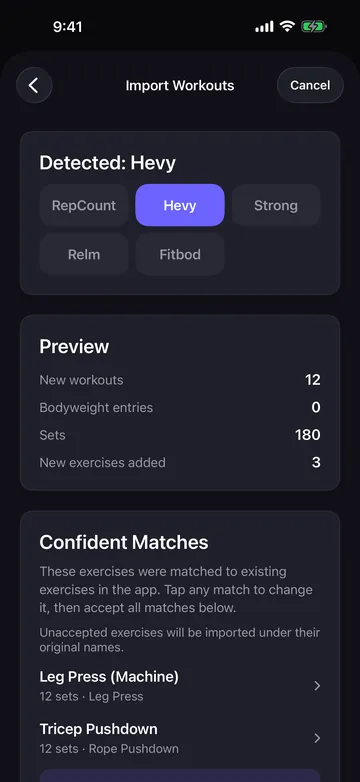
Follow the steps for your current app, then choose the exported file in Relm.
Email us the app name and we can add import support for it.
Five steps, and nothing is saved until the last one.
Open Settings → Data & Privacy → Import Workouts, or use the import step during setup. Choose the app you exported from, follow its steps above, then pick the CSV. Relm recognizes the format from the file’s header and lets you override it if it guessed wrong.
Strong and RepCount exports don’t record whether weights are kg or lbs, so you choose. Hevy and Fitbod state it in the file and Relm reads it from there.
You see how many workouts, sets and bodyweight entries the file holds, how many workouts are already in your history, and any rows Relm couldn’t read, each listed with its row number and the reason. Your file is never changed.
Most names match on their own. The rest are sorted into three cards depending on how sure Relm is, so you only decide where a decision is needed. The details are below.
Tap Import, and the workouts, exercises and bodyweight entries land in your history in one go. A summary shows what was added, what was skipped and any new exercises Relm couldn’t sort into a muscle group.
Every exercise in the file is matched against your library before anything is imported. Relm never merges two exercises without showing you.
Same exercise, different spelling: exact names, the common export forms like “Bench Press (Barbell)”, abbreviations like DB, and a gym brand written in front of a machine. These map straight onto your library.
One likely match, shown for review. Accept them all with a single tap, or tap any row to pick a different exercise. Anything you leave unaccepted imports under its original name.
Several candidates, usually equipment: a “Skull Crusher” could be the barbell, dumbbell or EZ bar version. Choose one, or leave it to import as its own exercise.
The name already exists in your library under another spelling. Pick the match before importing so your history doesn’t split across two exercises.
Anything else is added as a new exercise under an auto-detected muscle group, so it counts toward your stats from the first session. A name Relm can’t place lands in Uncategorized, and you can assign a group in the exercise library later.
Imported sessions can contribute to exercise trends and future decisions instead of living in a disconnected archive.
Having trouble downloading?
TikTok blocks App Store links. Tap ••• and open this page in Safari, then tap Download on the App Store.